Budget · Allocation
By Marc, Pulse Pilot
·
3 min read
From the team at Pulse Pilot — Amazon PPC software that runs your bids by your rules (Pilot) or fully hands-off (Autopilot).
Ask most sellers how they set their PPC budgets and the honest answer is “I picked a number when I launched the campaign.” Then it never changes. Thirty days later, the budget still reflects what you guessed, not what’s working.
From a real account: where 30 days of budget actually went
Here’s one of our own accounts: $2,089 of ad spend over 30 days, grouped by product.
Product A: 32% of the spend, 19% of the sales, 73% ACoS.
Product B: 25% of the spend, 12% of the sales, 98% ACoS.
Product C: 20% of the spend, 44% of the sales, 20% ACoS.
Product D: 19% of the spend, 22% of the sales, 38% ACoS.
Products A and B took 57% of the budget and brought in 31% of the sales. Product C, the best performer at a 20% ACoS, got 20% of the budget, and its main campaign spent its full daily budget on average. While it was being held back, the account kept paying 73–98% ACoS on the others.
Nobody decided that on purpose. The budgets were set at launch and never revisited.
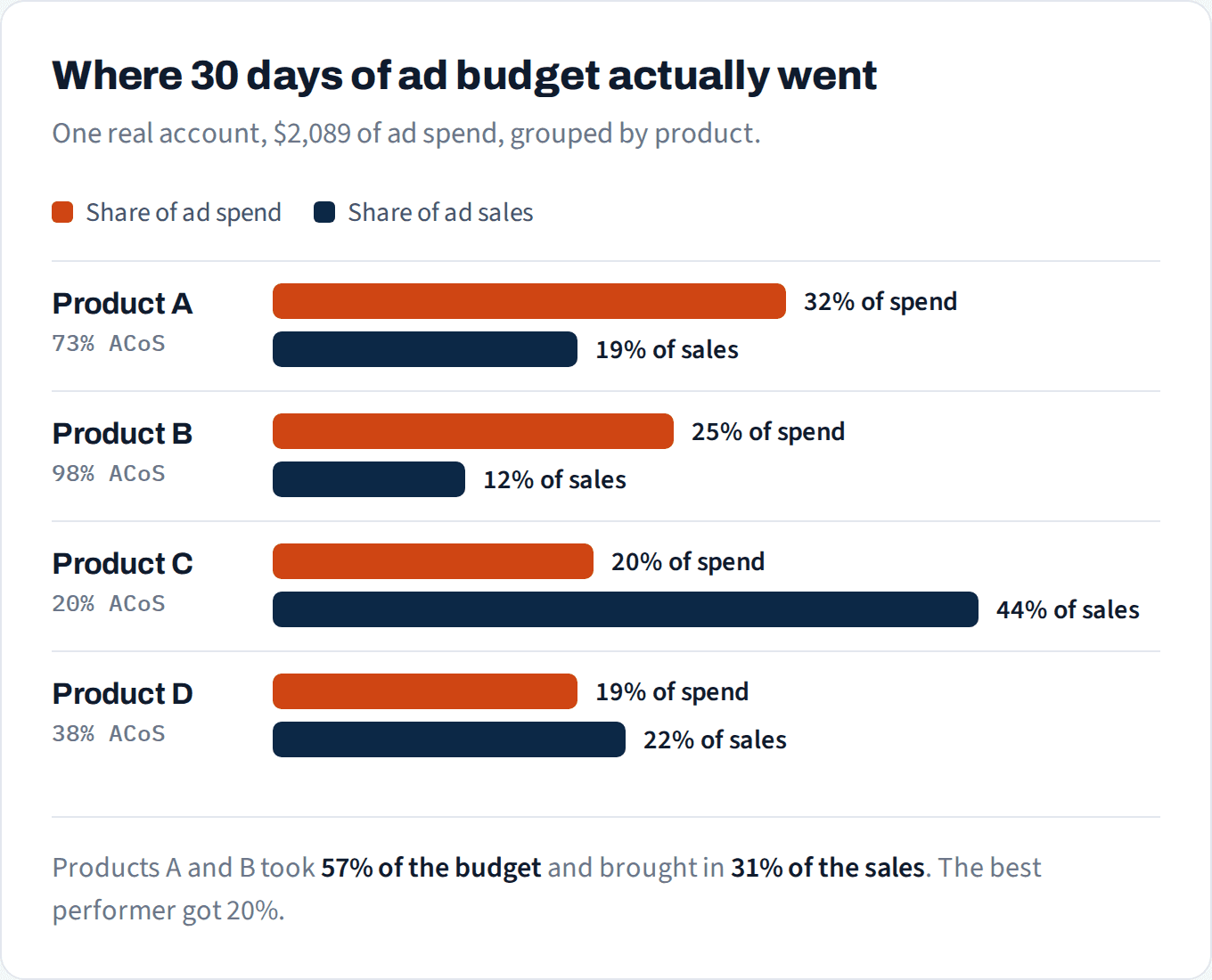
Share of spend vs. share of sales, 30 days, one real account.
Not sure which products deserve your budget?
We'll show you which listings convert above the market and where spend costs more than it earns.
No credit card
Ads access only
Changes nothing in your account
The 3 checks
1. Share of spend vs. share of sales. Put every product (or campaign) side by side. If something takes a bigger slice of the spend than of the sales, it needs a reason to be there, such as a launch you’re deliberately funding. If there’s no reason, it’s leaking.
2. Who’s hitting their budget cap? A campaign that runs out of budget and has a good ACoS is the cheapest growth you’ll ever find: it’s already proven, just held back. Raise that budget first. A campaign that hits its cap with a bad ACoS is spending fast on the wrong things, so fix its bids and targeting before it gets more money.
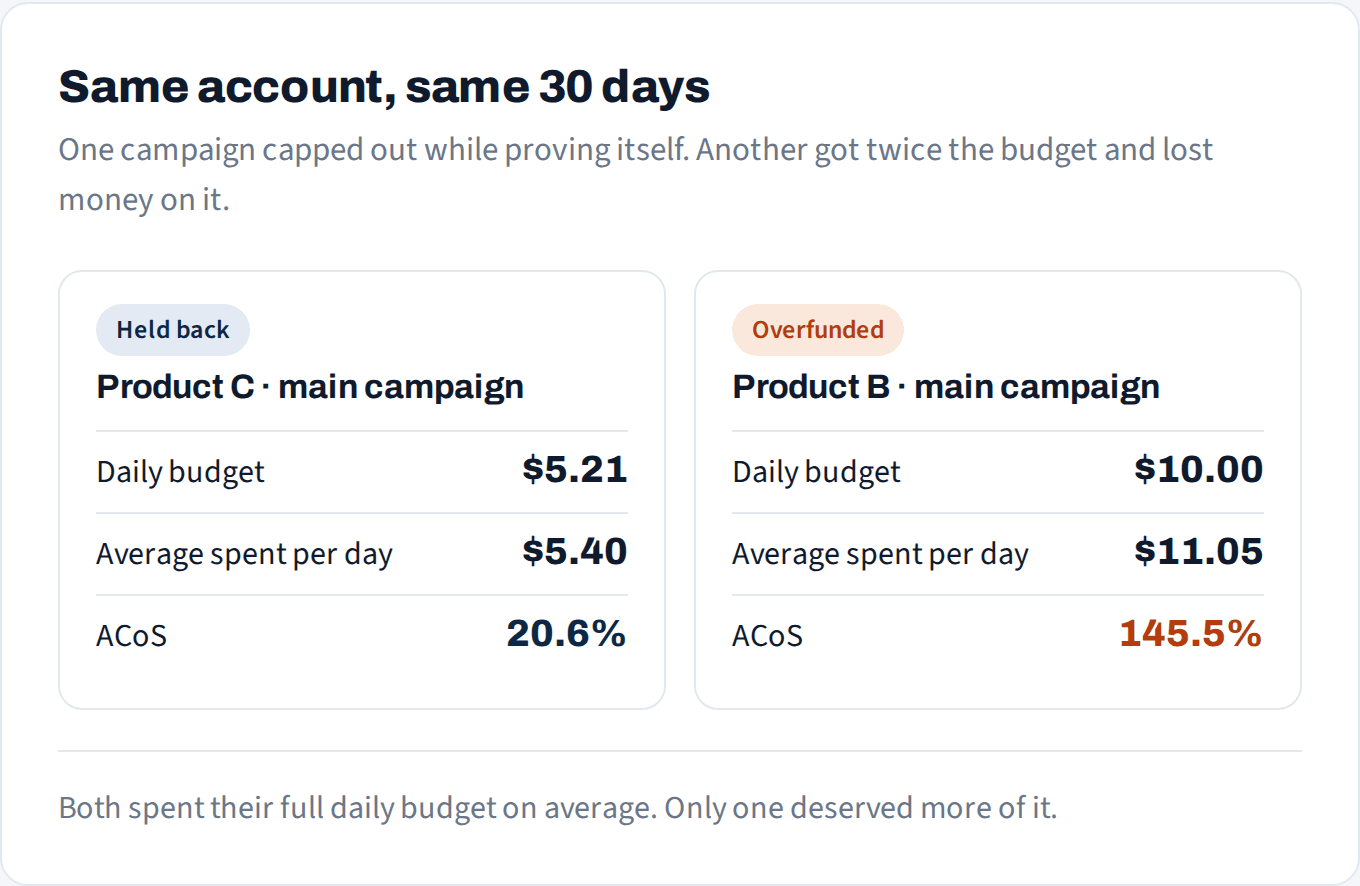
Both spent their full budget. Only one deserved more of it.
3. Budget follows proof, not hope. New launches deserve a budget, but a set one, with an end date and a loss you’ve agreed to in advance. “Let’s give it another month” is how a launch quietly becomes a quarter of your spend.
How to move budget without breaking things
Move it in steps, about 20–25% at a time, and give each change a week. Sales attribution takes up to 7 days, so judging a budget change after 2 days misleads you.
Raise winners before you cut losers. Cutting first shrinks total sales while you wait to see if the raise works. Raising first keeps sales moving.
Watch total sales, not just ACoS. Moving budget to a winner should lift total sales. If ACoS improves but sales drop, you cut too much.
How to do this in Pulse Pilot
Budget Pacing spreads a weekly or monthly budget across days and adjusts daily budgets as it goes, so a product stops running dry at noon.
Tag budgets: tag your products’ campaigns, set one budget for the tag, and let Pulse Pilot split it by ROAS, conversion rate or ACoS. The products earning it get more automatically.
Budget rules: raise or lower a campaign’s budget by % or $ when it meets your conditions. For example: raise 20% when ACoS is under your target and the campaign spent its full budget.