Keywords · From a real account
By Marc, Pulse Pilot
·
5 min read
From the team at Pulse Pilot — Amazon PPC software that runs your bids by your rules (Pilot) or fully hands-off (Autopilot).
Negative keywords are the fastest way to stop paying for searches that will never buy. They’re also the easiest way to quietly block the searches that do. Most sellers get negatives wrong in one of two directions: too late, so the junk keeps eating budget, or too broad, so good shoppers get blocked along with it.
Here’s how to get them right, with numbers from one of our own accounts. One note: Arvella is a made-up brand. The real searches named the brand of vacuum our bags fit, and we’ve swapped in a fictional name so we’re not using anyone else’s trademark. Every number is real.
Negative exact vs negative phrase
There are two kinds of negative keyword for Sponsored Products, and they behave very differently:
Negative exact blocks one search: the exact words, in that order. “Arvella vacuum” blocks “Arvella vacuum” and nothing else.
Negative phrase blocks every search that contains the phrase. “Arvella vacuum” also blocks “Arvella vacuum bags”, “Arvella vacuum cleaner”, “Arvella vacuum filters” and anything else built around it.
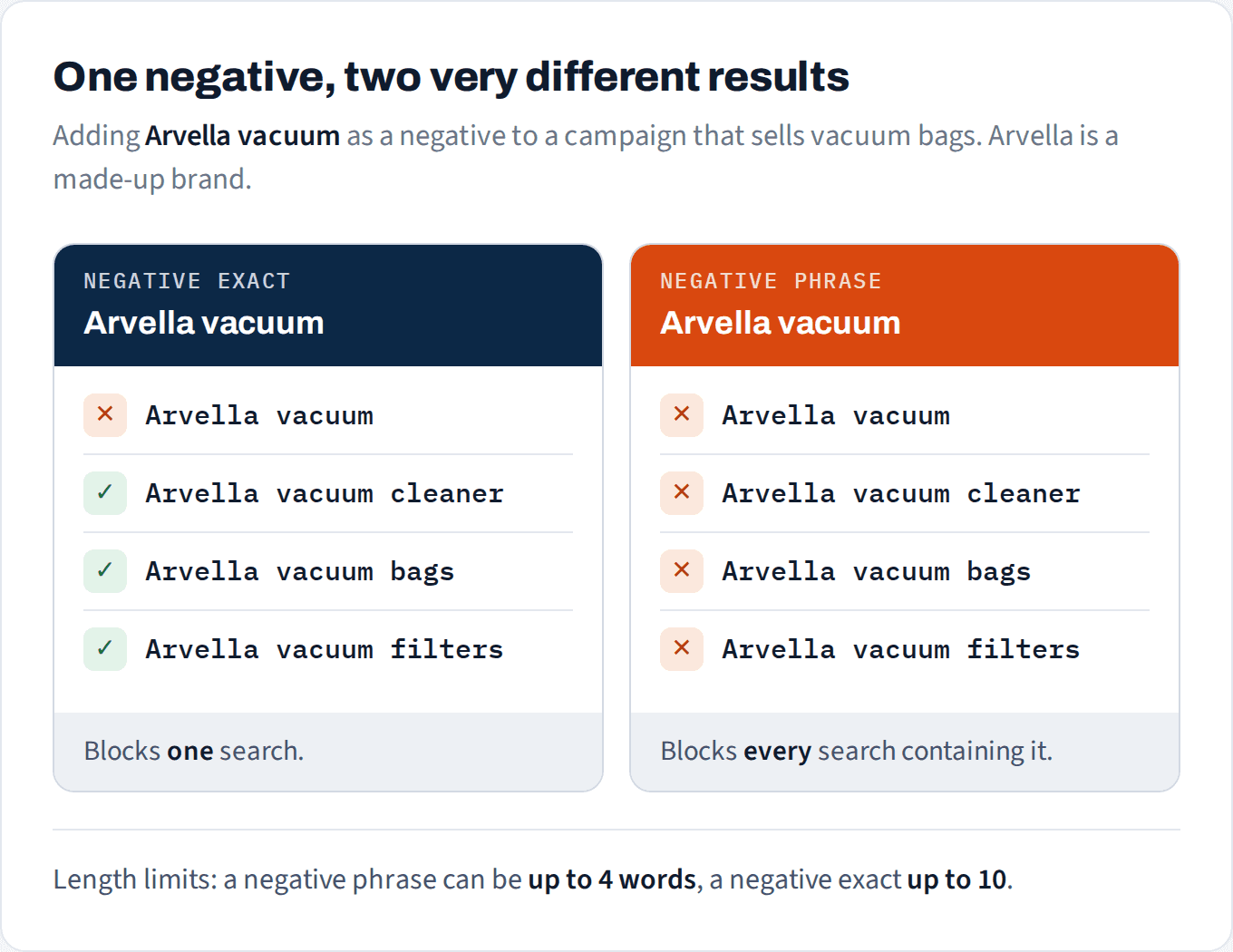
Negative exact is a scalpel. Negative phrase is a net.
One detail most guides skip: a negative phrase can be at most 4 words long. Amazon rejects anything longer. A negative exact can run up to 10 words. So if you want to block a long, specific search, it has to be a negative exact. And if a long phrase you added never seems to take effect, check whether it was ever accepted.
The search term that looked like waste
Here’s why negative phrase needs care. In one of our automatic campaigns for a vacuum bag (Product A), the search “Arvella vacuum” took 3 clicks, cost $14.86 and sold nothing. It looks like someone shopping for a vacuum, not bags. The obvious move is a negative phrase on “Arvella vacuum”.
That negative would also have blocked 13 other searches in the same campaign. Together they brought in 6 orders and $89.94 in sales over 60 days, including “Arvella vacuum cleaner”: the busiest search in the campaign, converting at 33% against Product A’s 20.7% average.

To stop $14.86 of waste, the phrase negative would have blocked six orders.
Shoppers who type “vacuum” are often looking for bags and filters for the vacuum they already own. You only see that by checking what else the phrase would catch.
The rule: before you add a negative phrase, search your search-term report for every term that contains it. If any of them have orders, use negative exact instead.
Not sure which search terms are wasting your budget?
We'll show you which ones have earned a negative, and which ones just need more time.
No credit card
Ads access only
Changes nothing in your account
When has a search term earned a negative?
Two questions, in this order.
1. Could this shopper buy your product at all? If the search is clearly for something else (the wrong model, the wrong size, a different category), negate it now. It doesn’t need more clicks to prove anything.
2. If it could, has it had enough clicks to judge? Zero orders isn’t a verdict until there have been enough clicks. The test is the same one we use for keywords in how many clicks before you cut a keyword:
Expected orders = clicks × your product’s conversion rate.
Under 2 expected orders: too early. Zero orders is normal at that point.
2 or more expected, still zero: it’s earned a negative.

Relevance first, then volume.
From a real account: most zero-order terms aren’t ready
We pulled every search term in one of our accounts over 60 days that had 3 or more clicks and no orders. There were 38 of them: 157 clicks and $310 in spend. It looks like a list to negate.
Run each one through the expected-orders test, at its own product’s conversion rate, and 37 of the 38 were too early to judge. They had 3 to 7 clicks each, which works out to between 0.5 and 1.5 expected orders. Zero orders at that point is just normal.
One had earned it: a search with 20 clicks on Product C, which converts at 19.3%. About 3.9 orders were expected, and it got none.
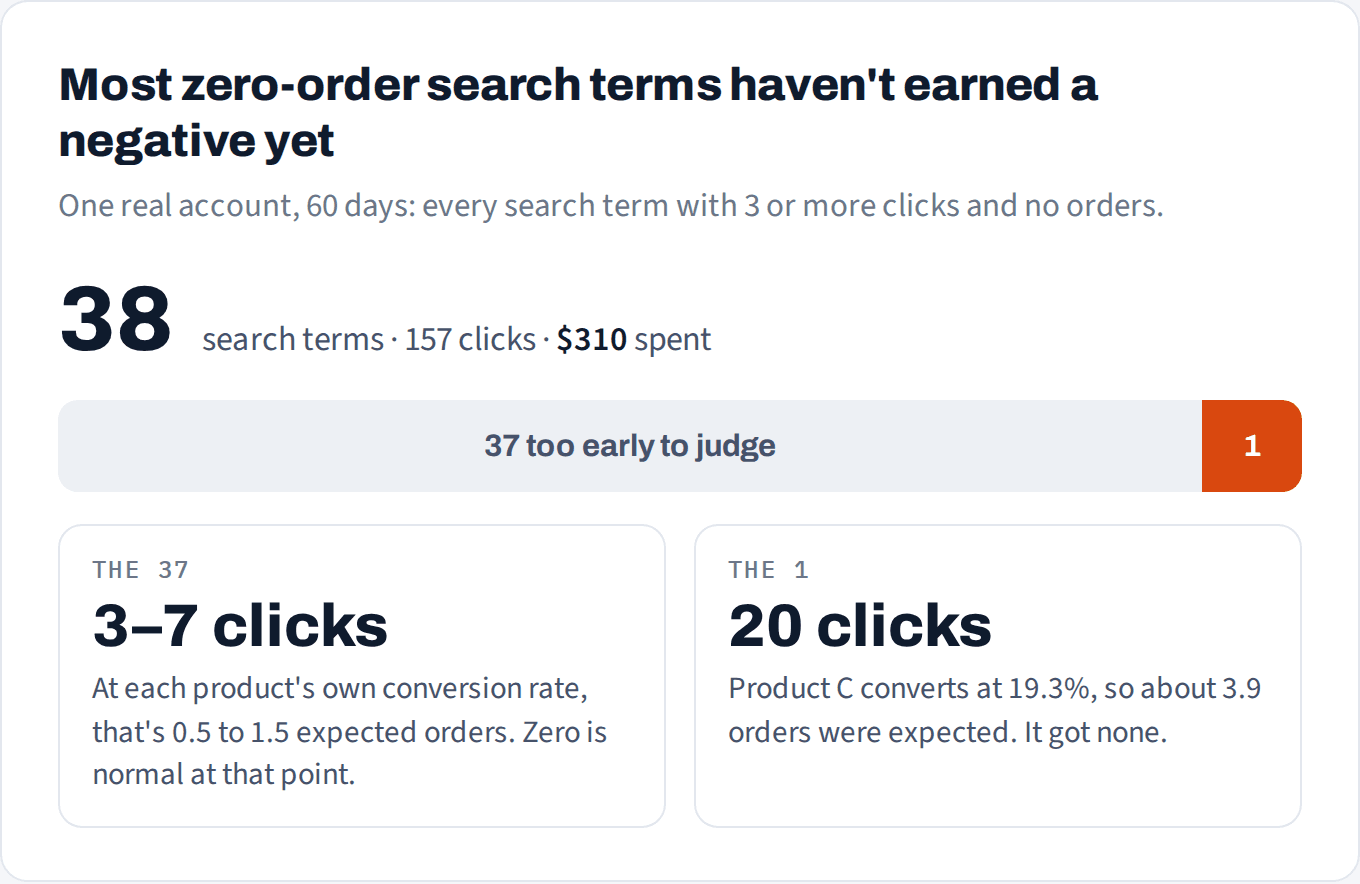
A zero-order list isn't a negative list.
Negating all 38 would have saved some money this month and blocked searches that, with a few more clicks, would have started selling. Several of them are close variants of searches that already sell well in the same account.
One more check before you negate the one that’s earned it: if the search term is also one of your own exact-match keywords, a negative isn’t the tool. Lower or pause that keyword instead.
Negatives after harvesting
There’s one negative almost every account should have. When a search term proves itself and you give it its own exact-match keyword in a new campaign, add it as a negative exact in the campaign it came from. Otherwise both campaigns bid on the same search, you compete with yourself, and the data splits across two places.
Use negative exact here, not phrase. A phrase negative would also block the longer variations your discovery campaign is still finding.
Three mistakes to avoid
1. Single-word negative phrases. Blocking “cheap” or “replacement” sounds safe, but one word catches every search that contains it. Check the report for buyers before you add one.
2. Negating a term because the product doesn’t convert. If a whole product converts below the market, every search term looks bad and negatives won’t fix it. Fix the listing before the bids, then judge the search terms again.
3. Judging on the last few days. Sponsored Products sales can take up to 7 days to be attributed. A search term with clicks this week and no orders yet may still convert.
How to set this up in Pulse Pilot
Find the candidates: filter the search-term report to any campaign and to terms with no orders, and see exactly how many clicks and how much spend each one used.
Add negatives in Pilot as negative exact or negative phrase straight from the search-term list, for the ad group or the whole campaign, and Pulse Pilot sends them to Amazon right away. When you add a negative phrase there, it checks Amazon’s 4-word limit first.
Negation rules can block any search term that reaches a click count you choose without an order, as a negative exact, negative phrase, or both. Set that click count from your conversion rate, as above.
Autopilot moves converting search terms forward: first into an exact-match research campaign, then the proven winners into a campaign of their own. Each time, it adds the term as a negative exact where it came from, so the two never compete for the same search. For live products it also blocks search terms that spend without selling, and you’ll see these in the Activity feed with the numbers behind each one.