Keywords · From a real account
By Marc, Pulse Pilot
·
6 min read
From the team at Pulse Pilot — Amazon PPC software that runs your bids by your rules (Pilot) or fully hands-off (Autopilot).
The rule everyone repeats
Ask in any seller group when to pause a keyword or negate a search term with no sales, and you’ll get a fixed number: 20 clicks, 7 days, $20 spent. It sounds disciplined. The problem is that it treats every product the same.
A product that turns 20% of clicks into orders and a product that turns 5% into orders need very different amounts of evidence. One fixed number can’t be right for both.
The one number that matters: clicks per sale
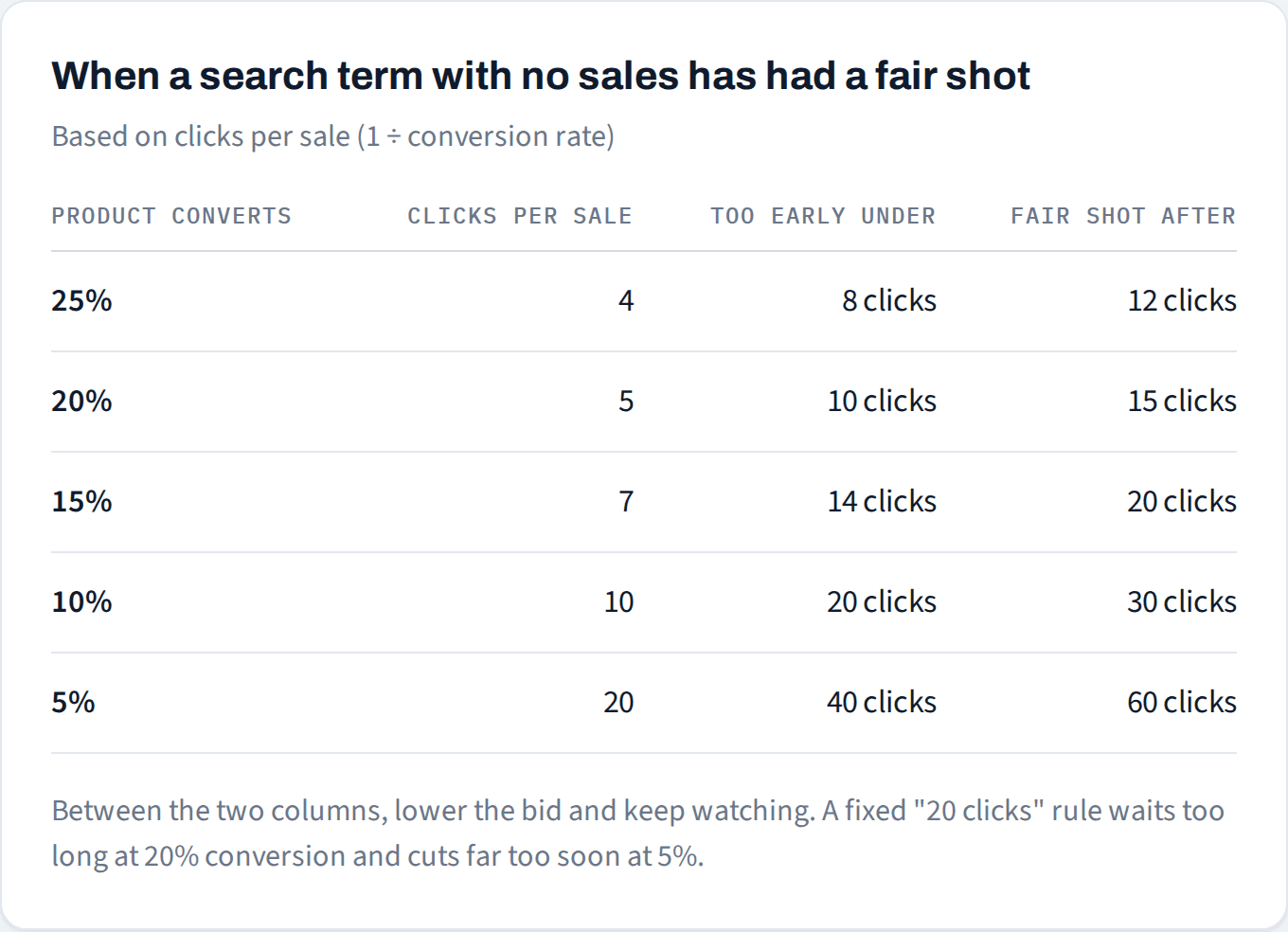
Your clicks per sale is 1 divided by your product’s conversion rate. Convert 20% of clicks and you average one sale every 5 clicks. Convert 5% and it’s one every 20.
Now compare a search term’s clicks to that number. Another way to say it: clicks × conversion rate is how many orders you’d expect it to have produced by now if it performed like the rest of your traffic.
Under 2× your clicks per sale: too early. Zero orders could easily be bad luck. Keep watching.
2× to 3×: borderline. Lower the bid and keep watching.
Past 3× with no sale: it’s had a fair shot. A search term that converts like your product would do this badly only about 1 time in 20. Negate it, or pause the keyword.
Keywords vs. search terms
One thing trips people up here. A broad or phrase keyword isn’t one search; it’s a bucket of many searches. Its overall conversion rate is usually lower than an exact keyword’s because the bucket includes searches that were never going to buy.
So judge the search terms, not the broad or phrase keyword as a whole. And judge each one against your product’s conversion rate, not the broad keyword’s. A relevant search should convert like your product does. If you use the bucket’s lower rate as the yardstick, you’ll keep paying for bad searches far longer than you need to.
Exact keywords are simpler: the keyword and the search are the same thing, so the same math applies to the keyword directly.
What this looks like on a real account
Here are the search terms in this account that took the most clicks without a single order over the last 90 days. Each one is judged against the conversion rate of the product it was advertising.
![Table: six zero-order search terms from the last 90 days with their verdicts. Model-specific bag search, Product C: 19 clicks, 17.3% conversion, 3.3 expected orders, Fair shot. Brand + bag type search, Product B: 11 clicks, 18.4%, 2.0, Lower bid. Brand bags search, Product B: 10 clicks, 18.4%, 1.8, Too early. Brand bags search, Product A: 9 clicks, 20.6%, 1.9, Too early. Model-specific bag search, Product A: 8 clicks, 20.6%, 1.6, Too early. [Brand] canister vacuum search, Product D: 10 clicks, 20.0%, 2.0, Irrelevant.](https://framerusercontent.com/images/v33BanDvbkJ1WBC866abhyenVc.png)
The top one is the clearest case. Nineteen clicks at a 17% conversion rate should have produced about three orders. The chance of a decent search term getting zero orders from 19 clicks is under 3%. That’s not bad luck anymore.
The second one sits right at 2× its clicks per sale. It’s not dead yet, but it’s earned a lower bid while it collects a few more clicks.
The three below it look just as bad at a glance, with $15 to $26 spent and nothing to show for it. But each is under 2 expected orders, and a perfectly good search term would still show zero orders at that point roughly one time in seven. Cutting them now would be a coin flip dressed up as a decision.
Not sure which search terms have had enough clicks?
We'll show you which searches are costing more than they can earn back.
No credit card
Ads access only
Changes nothing in your account
The exception: irrelevant searches are waste at any click count
Look at the last row. The shopper searched for a canister vacuum, and the ad was for replacement bags. They wanted the machine, not the bags. That search would be wrong for the product at 2 clicks or 200, so the click math doesn’t apply. Negate it as soon as you see it.
Expected orders tell you when you’ve seen enough. Relevance tells you whether you needed to wait at all.
Try it on your own search terms
Before you cut anything
Is the search relevant?
If the shopper clearly wanted something else, negate it now. No click count needed.Compare clicks to clicks per sale.
Under 2× keep watching, 2–3× lower the bid, past 3× with no sale negate it or pause it. If your product converts below its market, use the market rate instead: a search term on that shelf should be able to do at least that well.Allow for late orders.
Amazon credits a sale to the day of the click, up to 7 days later. Clicks from the last week can still turn into orders, so don’t judge them yet.Lower the bid before you kill it.
A search term that converts below your product’s average might still work at a lower bid. Negate it when it’s irrelevant or when a lower bid still can’t make it pay.
Common questions
How many clicks before I pause a keyword?
About 3 times your clicks per sale with no order. At a 10% conversion rate that’s around 30 clicks; at 20% it’s around 15. Between 2× and 3×, lower the bid first.
When should I negate a search term with no sales?
Straight away if it’s irrelevant to your product. Otherwise use the same rule: past 3× your clicks per sale with no order, negate it.
Should I archive a keyword or just pause it?
Pause it. A paused keyword keeps its history and you can turn it back on later, for example in peak season. Archiving is permanent.
What is clicks per sale?
1 divided by your conversion rate: the average number of clicks it takes to get one order. It’s the yardstick for judging any keyword or search term.
How to check this faster
Most sellers do this math in a spreadsheet. Pulse Pilot’s free audit does the first pass for you: it shows which searches your spend is flowing through at the wrong price, and which products convert below their market, using your own account’s numbers. It also shows each product’s market conversion rate, so you know which yardstick to use.
Previous post: Cutting bids is the usual fix for high ACoS. Check this first.