Structure · From a real account
By Marc, Pulse Pilot
·
6 min read
From the team at Pulse Pilot — Amazon PPC software that runs your bids by your rules (Pilot) or fully hands-off (Autopilot).
A seller on r/AmazonFBA asked a question we see every week. Two products, a simple plan: run auto campaigns for a week or two, see which keywords work, move those into exact-match campaigns, and keep auto running to find more.
That plan is right. It’s the same basic shape we run on our own products. But the details decide whether it works, and three of them trip up almost everyone: how long to wait, what counts as “working”, and what you do with the winner after you move it. Here’s how we structure it, with real numbers from our own account.
Every campaign gets one job
The whole idea is to separate two jobs that pull in opposite directions:
Discovery campaigns (auto, or broad match) find out what shoppers actually type. They’re supposed to try lots of searches you’d never think of. Some will be great. Most will be noise.
Exact campaigns spend on searches that have already proved they sell. No exploring. Every dollar goes to something with a track record.
When one campaign tries to do both, you lose control of where the money goes. Your budget follows whatever Amazon matches, and the searches you know sell end up competing with experiments for the same daily budget.
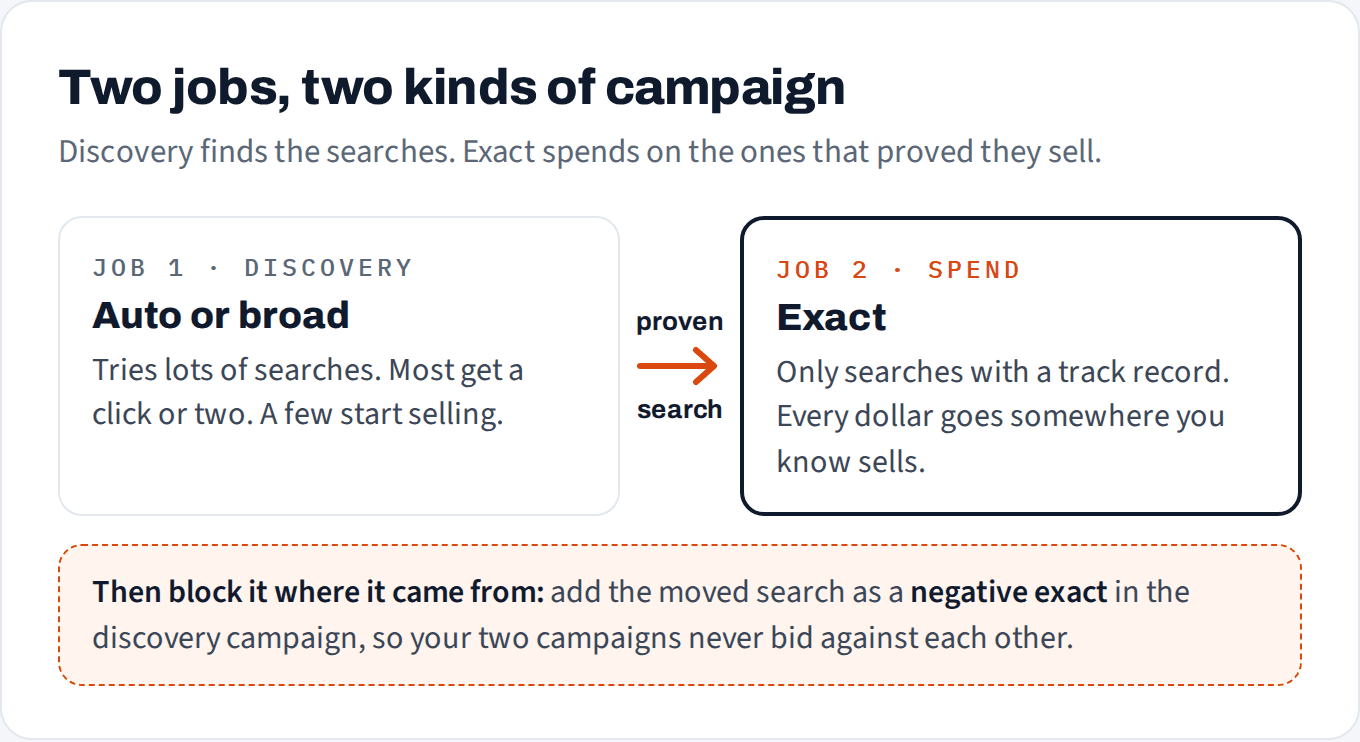
Discovery finds, exact spends, and the negative keeps them from competing.
One more rule before anything else: one product per campaign. If two products share a campaign, the one Amazon prefers takes the budget, and you can’t tell which product a search actually sells. We wrote about what that does to a budget in your PPC budget might be going to the wrong products.
A week or two of auto tells you less than you think
This is where the plan usually breaks. After a week of auto, it feels like you have data. You have a long list of search terms, some with a sale, most without. The problem is that almost every row on that list has one click.
We pulled 60 days of auto campaign data for three of our products. Not one week, sixty days:

60 days of auto, three products: most search terms got a single click.
Across three products, auto showed our ads on 250 different searches. 209 of them got exactly one click. Only 4 searches made it to two or more orders in two months. Product D’s auto campaign touched 53 different searches and none of them got past one sale.
A search with one click and one sale looks like a 100% conversion rate. A search with one click and no sale looks like 0%. Neither tells you anything. That’s the same math we covered in how many clicks before you cut a keyword: until a search has had enough clicks to expect about two orders at your product’s normal conversion rate, it’s too early to judge it in either direction.
So don’t run auto for “a week or two” and then switch to exact. Run auto continuously, and move searches out one at a time, as each one earns it. Some will take a week. Most never will.
Not sure which of your search terms have earned their own exact keyword?
Our free audit looks at your last 60 days of ads and shows which searches you overpay for, or underbid. Read-only, nothing changes.
No credit card
Ads access only
Changes nothing in your account
When a search term has earned its own exact keyword
“Working” should mean more than one lucky sale. Here’s an example rule that’s simple enough to run by hand and strict enough to avoid most false starts:
At least 2 orders from that search, so it’s more than a fluke.
A conversion rate at or above the product’s own average, over the same window (we use 60 days). A search that sells, but sells worse than your product normally does, isn’t a winner yet.
An ACoS you can live with at the bid you’d give it in exact.
Treat this as a starting point, not a formula. A low-priced product with a high conversion rate can move faster; an expensive one with a low conversion rate needs more patience. (This is an example rule written for this post, not Pulse Pilot’s own algorithm. Pilot and Autopilot weigh more factors when they decide.)
Here’s why the move is worth it. Same three products, same 60 days, comparing each product’s auto campaign with the exact campaign its proven searches moved into:

Same products, same 60 days. Proven searches in exact converted better in every case.
Product D’s auto converted at 9.1%. Its proven searches, running as exact keywords, converted at 26.2%, and their ACoS was 16.9% against 71.1% in auto. That’s not because exact match is magic. It’s because those searches had already proved they sell, and exact lets you put the money on them on purpose instead of hoping auto finds them again.
One honest caveat: auto isn’t always the expensive one. Product C’s auto campaign actually had a slightly lower ACoS than its exact campaign, because auto clicks were cheap (about $0.72 against $1.09). Discovery isn’t waste. It’s just a different job, and it should get a different share of the budget.
Block it where it came from
This is the step most beginners skip. You move a winning search into an exact campaign, but auto keeps matching it too. Now you have two of your own campaigns bidding on the same search. They don’t help each other; Amazon picks one, the data splits across both, and you can’t tell which bid is doing the work.
The fix: when a search moves to exact, add it as a negative exact in the campaign it came from. Negative exact, not negative phrase, so you only block that one search and auto can keep finding its cousins. If you’re not sure about the difference, our post on negative keywords walks through it.
Budget by job, not by campaign
Once you have both kinds of campaign, decide how the money splits between the jobs. A simple example to start with:
Discovery gets a capped share. Something like a quarter of the product’s ad budget. Enough to keep finding new searches, not enough to eat the budget your winners need.
Exact gets the rest, and it grows as more searches prove themselves.
New products are the exception. With nothing proven yet, discovery has to carry most of the spend at first. Shift the balance toward exact as winners appear.
Three mistakes we see all the time
Judging auto after a week. Most searches will have one click. Wait for the click count, not the calendar.
Moving a search to exact and leaving it live in auto. You end up competing with yourself. Add the negative exact at the same time as the move.
Building a campaign for every match type on day one. Separate broad, phrase and exact campaigns for every product, before you have any proven searches, spreads a small budget so thin that nothing gets enough clicks to judge. Start with discovery plus one exact campaign per product, and split further only when there’s enough volume to justify it.
How to set this up in Pulse Pilot
You can run all of this by hand with a search term report and a spreadsheet. If you’d rather not, here’s how Pulse Pilot handles it.
In Pilot, you set the rules. A harvest rule watches the campaigns you pick as discovery. When a search term meets your conditions (orders, conversion rate and ACoS over a lookback window you choose), it adds the search as an exact keyword in the campaign you choose, or in its own new campaign, at the bid you set. Tick one box and it also adds the negative exact back in the source campaign, so the two never compete. Every promotion shows up in your Harvest Log. Here’s the example rule from this post, set up the way Pilot builds it:
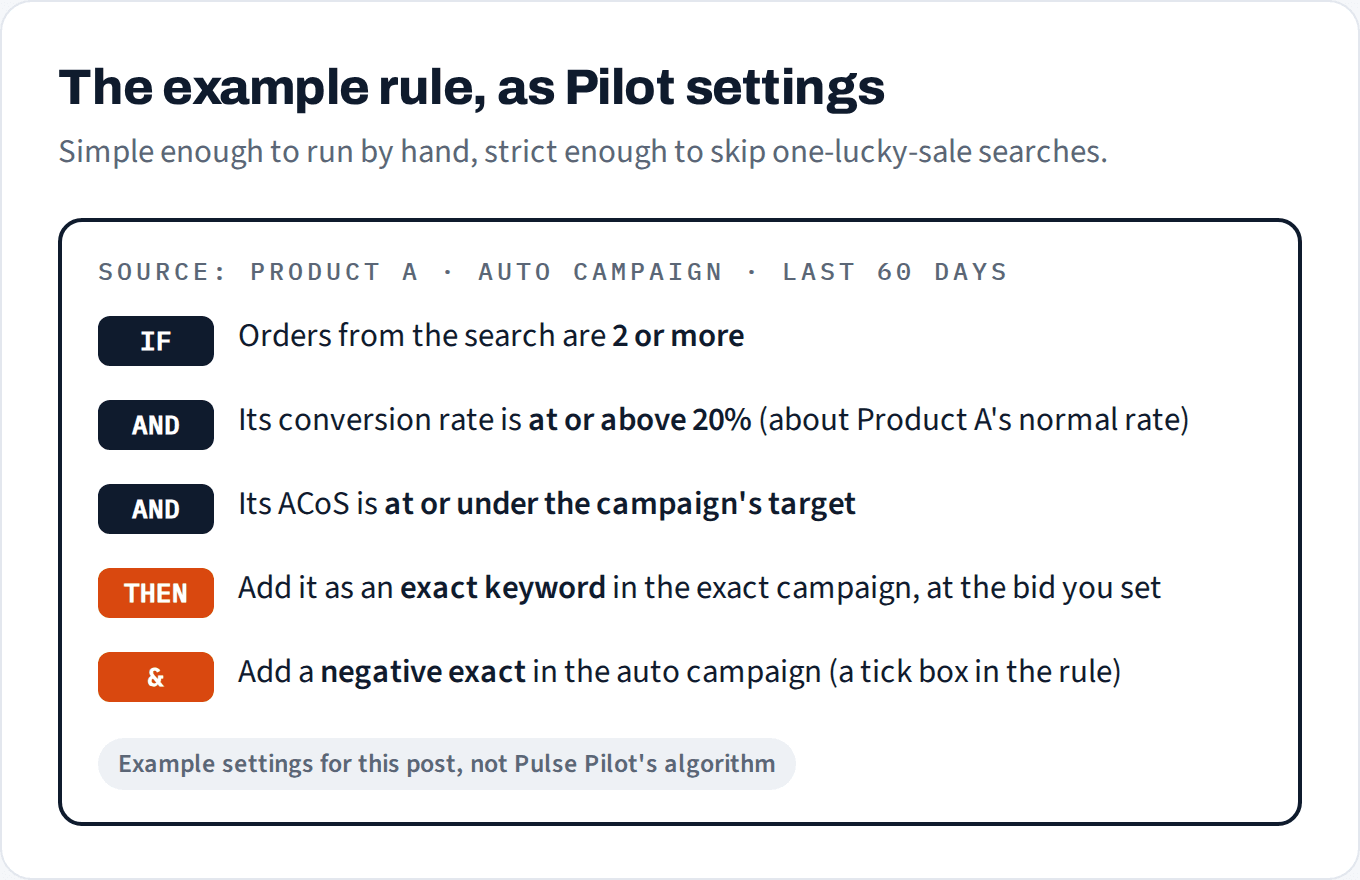
The example rule from this post, as Pilot settings. Example settings, not Pulse Pilot's algorithm.
In Autopilot, the structure is built for you. For each product, Autopilot sets up its own discovery and research campaigns, moves searches that prove themselves into exact keywords, blocks them in the campaign they came from, and gives a search its own campaign once it keeps selling. You see every move in the activity log, with the reason in plain words.
Either way, the structure is the same one in this post: discovery finds, exact spends, and nothing competes with itself.