Strategy · Keywords
By Emily, Pulse Pilot
·
7 min read
From the team at Pulse Pilot — Amazon PPC software that runs your bids by your rules (Pilot) or fully hands-off (Autopilot).
Ask a new seller which keyword they want to rank for and you’ll almost always get the biggest one in the category. “Garlic press.” “Dog bed.” “Phone case.” It makes sense: that’s where the searches are.
It’s also where every established competitor already sits, with thousands of reviews and a sales history Amazon trusts. Bidding on that search from day one usually means paying the highest prices in the category to lose most of the sales. There’s a better order to do this in, and it starts with knowing which kind of search is which.
Head terms vs long-tail keywords

A made-up product used as the example throughout. The searches are illustrations.
A head term is the short, broad search for the whole category. A long-tail keyword is a longer, more specific search: it names a material, a size, a feature or a use. In between sit the mid-tail searches, like “stainless garlic press.”
One thing we’ve learned from our own account: word count isn’t really the test. Some of our products are replacement parts, and a two-word search for those already tells you exactly what the shopper needs. The real question is how many different things the shopper could want. “Garlic press” could mean twenty products. “Stainless garlic press with peeler” means one kind.
Why the long tail comes first
Three reasons, in order of how much they matter:
Fewer sales move you up. Organic rank follows steady sales on a search. On a small search, a handful of sales a week can be enough to climb. On the head term, the same sales barely register.
The shopper is already sold on the type. Someone typing every feature of your product isn’t browsing. If your listing matches, they’re likely to buy.
Clicks usually cost less. Fewer advertisers compete for each specific search.
On that last point, here’s what the 200 biggest-spending searches in our own account cost per click over 60 days:

Cost per click by number of words in the search, from our own account.
The shortest searches were the most expensive: about 30% more per click than four-word searches. One honest caveat: our very longest searches (five words or more) averaged $2.16, so length alone doesn’t make a click cheap. A specific search that matches your product is what pays off.
What it looks like in rank
One of our older products shows the difference clearly. On the specific model-number searches it was built for, it sits around #32 organically. On the general search for the same thing, it’s mostly between #55 and #85, day to day.
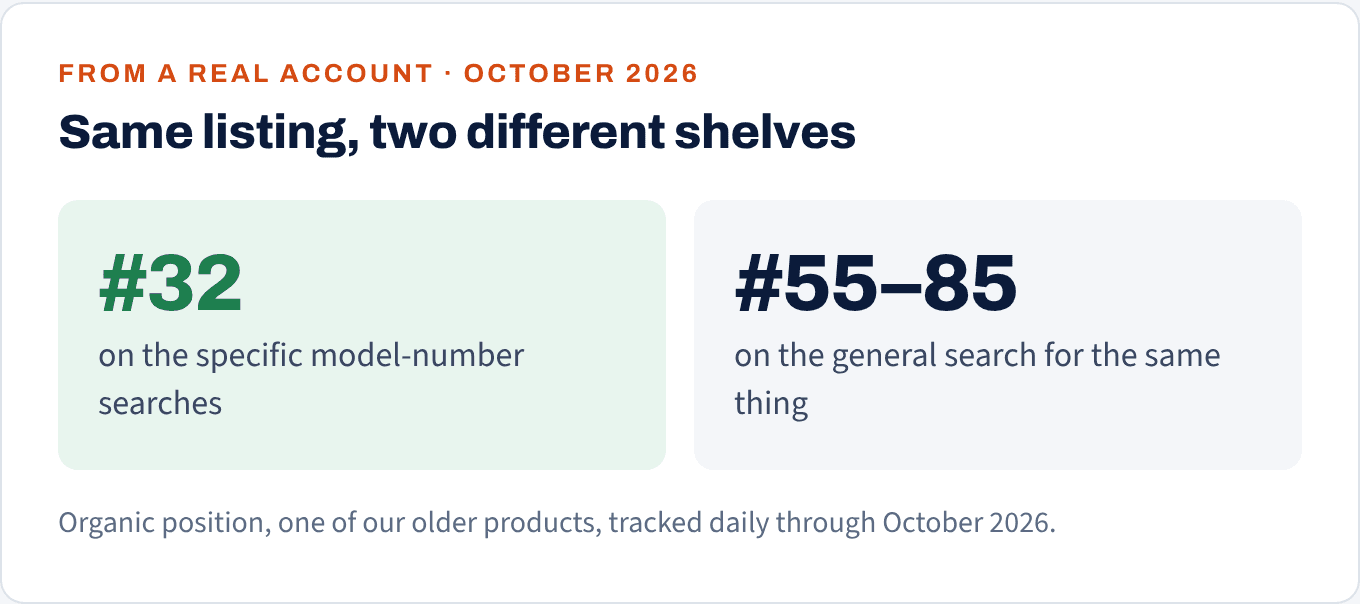
The specific searches are where this listing can compete. The general one isn't, yet.
Same listing, same reviews, same price. The specific searches are a shelf it can compete on. The general search is a different shelf with different competitors.
Not sure which of your searches are worth the money?
Our free audit shows where your ad spend goes and what it's buying you. Ads access only, nothing gets changed.
No credit card
Ads access only
Changes nothing in your account
Work up the ladder, one rung at a time
The plan is to start where you can win and use those sales to earn the next search up. Here’s how that might look for our made-up “Northbay” garlic press:

Start with step 1. Each step's sales help earn the next one.
Notice that every search on the ladder contains “garlic press.” That’s on purpose. Exact matches aren’t the only sales that build rank on a search: a sale on any search that contains every word of it adds relevance too. So each sale on “stainless garlic press with peeler” is also a small vote for “garlic press.” Amazon doesn’t publish the details, but it’s why the long tail isn’t a side road. It’s the on-ramp.

This is the view Pulse Pilot's Rank Tracker gives you for any tracked keyword, shown here with example data.
When a head term is worth bidding on
Not never, just not first. A head term earns a place in your campaigns when:
You’re already near the top on the mid-tail searches. If you can’t win “stainless garlic press,” you won’t win “garlic press.”
Your listing can stand next to page one. Look at the top 10 results. Similar price, similar rating, enough reviews that a shopper won’t skip you.
Your bid has a ceiling. Work out the most a click is worth to you before you start (we walk through that math in this post on high ACoS). Head terms will happily take every cent above it.
When you do bid on it, put it in its own exact-match campaign, so its spend and results never get mixed in with searches that are already working.
How to find your long-tail keywords
You don’t have to guess them. Your shoppers type them for you:
Run a discovery campaign (auto, or broad match) on a modest budget. Its job is to show your product on searches you’d never think of.
Read the search-term report. Look for specific searches that have turned into sales. Give each one enough clicks before you judge it (here’s how many clicks to give a keyword).
Move the winners into exact match, and add them as negatives in the discovery campaign so the two don’t compete. We cover this hand-off in discovery first, then exact.
Three mistakes we see often
Bidding on the head term on day one. It’s the most expensive way to learn that a new listing can’t win there yet.
Judging long-tails by impressions. Of course they get fewer. Judge them by sales and where you rank, not by how often they show.
Assuming longer is always better. A long search that doesn’t describe your product is just a cheap way to buy the wrong click. Specific and relevant beats long.
How to set this up in Pulse Pilot
Pulse Pilot runs your Amazon ads two ways: Autopilot, which runs them hands-off toward your goal, or Pilot, your own sandbox for building rules.
Give every long-tail its own campaign. Create single-keyword campaigns in a few clicks, so each search you’re climbing on gets its own budget and bid, and its results never mix with anything else.
Harvest winners straight into them. Set a harvest rule, and when a search from your discovery campaigns proves it sells, it can move into its own single-keyword campaign and be added as a negative exact where it came from. On Autopilot, this happens for you: a proven search steps up through a research campaign first, then into its own single-keyword campaign.
See everything that builds your head-term rank. Expand any keyword in the Rank Tracker and you’ll see every customer search from the last 14 days that contains all of its words, the ads serving them, and the sales they’ve brought in. It’s the clearest way to watch the long tail carry you up to the big search.